 Number Ranges to Vendor Account Groups" width="" height="" />
 After defining vendor account groups and number range intervals for vendor accounts in SAP, the next configuration step is the assignment of number ranges to vendor account groups in the SAP system.
It is a mandatory configuration step when you are creating the customer accounts as per account groups, and the system generates a number for vendor account as per this number range intervals.
You Assign Number Ranges to Vendor Account Groups in SAP by using the following navigation method.
In this activity, we will assign “88” number ranges to the “AD01” vendor account group in SAP.
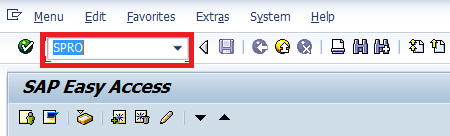
Step 1:- Enter transaction Code SPRO in the SAP command field and press enter.
Number Ranges to Vendor Account Groups" width="" height="" />
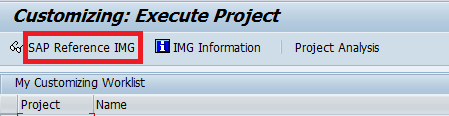
S te p 2:- Select SAP Reference IMG
 Number Ranges to Vendor Account Groups" width="" height="" />
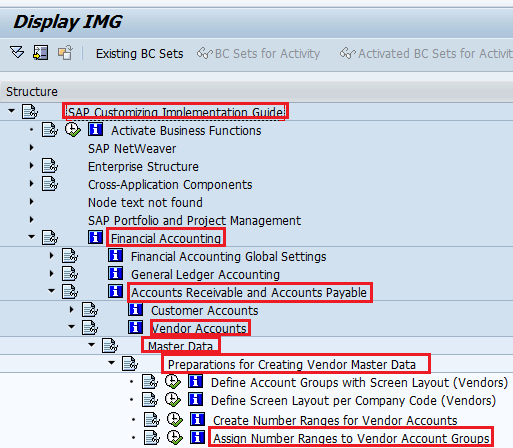
Step 3:– Follow the IMG menu path
 Number Ranges to Vendor Account Groups" width="" height="" />
Step 4:– Select Position
Now update the vendor account group that you want to assign number ranges and press enter.
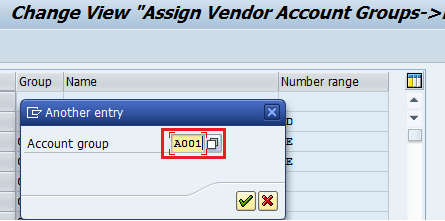 Number Ranges to Vendor Account Groups" width="" height="" />
Step 5:– Update Number range key in the number range field
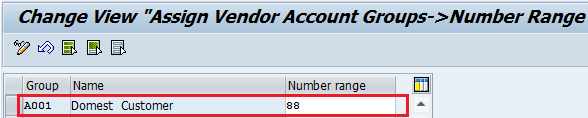 Number Ranges to Vendor Account Groups" width="" height="" />
Step 6: – Click on the save icon to save the configured setting

Thus Number range intervals are successfully assigned to vendor account groups in the SAP system.
